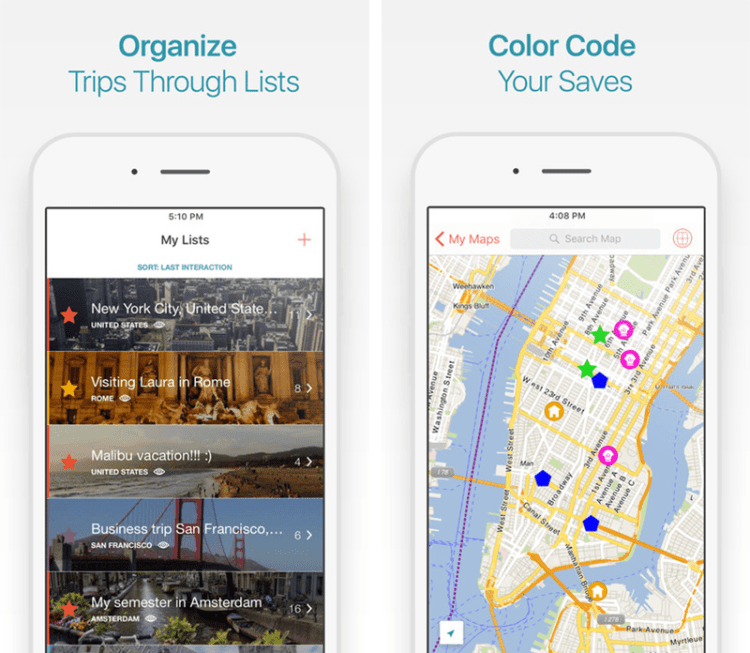
Navigating unfamiliar territories without internet access can be daunting, but thankfully, offline travel apps offer a reliable solution. These applications allow users to download maps and points of interest beforehand, ensuring seamless navigation even in areas with limited or no connectivity. This exploration delves into the best offline navigation apps, their functionalities, and crucial tips for effective usage, transforming the experience of exploring the world beyond the digital tether.
From backpacking through remote trails to exploring bustling city streets, offline navigation apps provide peace of mind and enhance the travel experience. This guide will compare various apps, examining their strengths and weaknesses in diverse travel scenarios, and will also discuss alternative methods for offline navigation, ensuring you’re prepared for any adventure.
Top Offline Travel Navigation Apps

Choosing the right offline navigation app can significantly enhance your travel experience, especially in areas with limited or no internet connectivity. Several excellent options cater to different needs and preferences, each with its own strengths and weaknesses. This section compares some of the most popular choices, helping you select the best fit for your upcoming adventures.
Offline Travel Navigation App Comparison
The following table compares five popular offline navigation apps based on key features. Remember that app features and performance can change, so it’s always advisable to check the latest app store information before downloading.
| App Name | Map Detail | Offline Map Download Size (Example) | Ease of Use | Supported Platforms |
|---|---|---|---|---|
| Maps.me | Detailed, including points of interest | Varies greatly depending on region; a large city might be 500MB – 1GB | Intuitive and user-friendly | iOS, Android |
| Gaia GPS | Highly detailed, excellent for hiking and backcountry navigation | Can be substantial, depending on area and detail level; potentially several GBs for a large region | Steeper learning curve than some other apps | iOS, Android |
| OsmAnd | Comprehensive, open-source maps with various data layers | Highly variable, depending on map detail and region selected | Moderately easy to use, with a range of features | iOS, Android |
| Here WeGo | Good detail for major cities and roads | Varies by region, typically smaller than Gaia GPS or OsmAnd for similar areas | Simple and straightforward interface | iOS, Android, Windows |
| Google Maps (Offline) | Good detail for major areas, but offline functionality is limited | Varies by region, download sizes generally smaller than dedicated offline apps | Very user-friendly, leveraging familiarity with the online version | iOS, Android |
App Suitability for Different Travel Scenarios
Each app’s strengths and weaknesses make them better suited to specific travel styles.Maps.me, with its ease of use and detailed maps, is excellent for city exploration and backpacking in well-traveled areas. Its relatively smaller download sizes are also beneficial for those with limited storage space on their devices. However, its off-road capabilities might be less robust than other options.Gaia GPS, on the other hand, excels in scenarios requiring precise navigation, such as backpacking or hiking in remote areas.
Its extensive detail and robust features make it ideal for users needing advanced navigation tools. The larger download sizes, however, might be a drawback for those with limited storage.OsmAnd, being open-source, provides a great deal of flexibility and customization. Its suitability spans various travel types, from road trips to city exploration and hiking, though the learning curve might be slightly steeper than Maps.me.Here WeGo is a solid choice for road trips and navigating major cities.
Its straightforward interface and focus on transportation options make it a practical option for those prioritizing simplicity. However, its offline detail might be less comprehensive than other options for off-road or remote areas.Google Maps’ offline capabilities are convenient for quick access to previously downloaded maps in familiar areas, but its offline functionality is more limited compared to dedicated offline navigation apps.
It’s best suited for supplementary offline use rather than primary navigation in areas without internet access.
Hypothetical Offline Navigation App UI Mockup
Imagine an app with a clean, intuitive interface. The main screen displays a detailed map, with your current location clearly marked. A prominent search bar allows for quick searches of points of interest, addresses, or coordinates. A menu button reveals options for downloading offline maps, adjusting map settings (e.g., terrain view, satellite imagery), and accessing user settings. A compass icon provides real-time orientation, while a prominent button shows your current route, if one has been planned.
The route would be clearly displayed on the map, with distance markers and estimated time of arrival. A prominent button would allow users to report inaccuracies in the map data. A simple and clear interface would enhance the user experience, particularly in challenging conditions.
Offline Map Data and Functionality
Offline navigation apps rely on storing map data locally to function without an internet connection. The type of data used and how it’s managed significantly impacts the app’s performance, storage needs, and overall user experience. Understanding these aspects is crucial for choosing an app that best suits your needs.The effectiveness of offline maps hinges on the type of data used and how it’s handled by the application.
Different approaches exist, each with its advantages and disadvantages.
Types of Offline Map Data
Offline maps primarily use two types of data: raster and vector. Raster maps are essentially images, similar to photographs, representing a geographical area. They are generally easier to render quickly, offering a visually immediate experience. However, they require significant storage space and lack the detail and scalability of vector maps. Zooming in on a raster map often reveals pixelation and loss of clarity.
Vector maps, on the other hand, use points, lines, and polygons to represent geographical features. This allows for greater detail and scalability; zooming in doesn’t result in a loss of quality. Vector maps are generally smaller in file size than raster maps with equivalent coverage because they don’t need to store pixel data for every zoom level. The trade-off is that vector maps require more processing power to render, potentially leading to slower performance on less powerful devices.
Many apps utilize a hybrid approach, combining aspects of both to optimize performance and storage. For example, a base map might be a compressed raster image, while points of interest are overlaid using vector data.
Offline Map Data Management
Different apps employ various strategies for managing offline map data. Caching is a common method where frequently accessed map areas are automatically stored locally. This provides quick access to commonly visited locations. Selective downloads allow users to choose specific areas for offline use, offering greater control over storage space and enabling users to download only the regions they intend to visit.
This approach is especially useful for travelers who plan to explore a specific region. Some apps use a combination of these techniques, automatically caching frequently used areas while also allowing users to manually download specific regions. Apps might also employ techniques like map tiling, breaking down large map areas into smaller, manageable tiles, to improve download and rendering speeds.
This allows for efficient downloading and storage of only the necessary map sections.
Challenges in Maintaining Up-to-Date Offline Map Data
Keeping offline map data accurate and current presents a significant challenge. Road networks, points of interest, and other geographical features are constantly changing. Regular updates are essential to ensure the accuracy of the offline maps. This requires considerable effort and resources from app developers, involving data collection, processing, and distribution. The frequency of updates varies greatly among apps, impacting the reliability of offline navigation in dynamic environments.
Some apps offer more frequent updates than others, leading to a trade-off between data freshness and storage requirements. The size of the update files can also be substantial, potentially requiring significant data transfer when updates are released.
Using Offline Navigation Apps Effectively
Successfully navigating without internet access relies heavily on proper preparation and understanding of your chosen offline navigation app’s features. This section will guide you through the process of downloading and utilizing offline maps, optimizing your device’s performance, and leveraging the app’s various navigation tools for a smooth and efficient travel experience.
Downloading and Using Offline Maps
Downloading offline maps is the crucial first step. Most offline navigation apps allow you to select a region or area for download, often using a zoom function on a map interface. The size of the downloaded area will directly impact the storage space required on your device. Smaller, more focused areas are ideal for specific trips, whereas larger regions are suitable for broader explorations.
After selecting your desired area, initiate the download process. The app will typically indicate download progress and notify you upon completion. Once downloaded, the offline map data will be available even without an internet connection. To use the downloaded maps, simply launch the app and navigate to your desired location as you would with an online map. The app will automatically utilize the offline map data if an internet connection is unavailable.
Remember to check your app’s settings to confirm offline mode is enabled before embarking on your journey.
Optimizing Battery Life and Data Usage
Efficient battery management is crucial for extended offline navigation. Before you leave, ensure your device is fully charged. While using offline maps significantly reduces data usage, some background processes may still consume battery power. Consider turning off unnecessary features like location services or background app refresh when not actively using the navigation app. Reducing screen brightness and limiting the use of other resource-intensive applications will further extend battery life.
Many apps also offer low-power modes, which can significantly reduce power consumption without drastically impacting functionality. For example, reducing the frequency of location updates or disabling certain visual elements can greatly improve battery life. Actively managing these settings before and during your journey will significantly improve your device’s endurance.
Navigating Using App Features
Offline navigation apps offer a range of features to enhance your travel experience. Turn-by-turn directions are a core functionality, providing voice guidance and visual cues on the map. These directions will guide you along your chosen route, notifying you of upcoming turns and changes in direction. Point-of-interest (POI) search allows you to locate nearby attractions, restaurants, or other points of interest even without an internet connection.
The app’s database of POIs is typically downloaded alongside the map data. Route planning is another essential feature; it allows you to plan your route in advance, considering factors such as distance, time, and traffic (if available offline). You can input your starting point and destination, and the app will calculate the optimal route, considering the downloaded map data.
This pre-planning eliminates the need for online searches while traveling and ensures a smoother journey.
Alternative Offline Navigation Methods
While offline travel apps offer considerable convenience for navigating without internet access, alternative methods have been used for centuries and still hold relevance today, particularly in situations where technology fails or isn’t available. These methods offer a degree of independence from digital devices and can be valuable supplementary tools, even when using apps.Exploring these alternative navigation techniques provides a deeper understanding of how to find your way, regardless of technological limitations.
A blend of traditional and modern methods often provides the most robust and reliable approach to offline navigation.
Paper Maps and Their Use
Paper maps, despite their seemingly antiquated nature, remain a reliable and readily available tool for offline navigation. Their primary advantage lies in their resilience to technological failures; a paper map will not run out of battery or malfunction. However, they require a level of map-reading skill and can be cumbersome to carry, especially for extensive travel. Detailed topographic maps are ideal for hiking and navigating unfamiliar terrain, while road maps are more suited to driving or cycling.
Effective use involves understanding map symbols, scales, and orientation techniques, often using a compass for accurate bearings. Careful planning of routes before departure is essential, as spontaneous route changes can be challenging.
Using a GPS Device
Handheld GPS devices offer a robust alternative to relying solely on smartphone apps. Unlike smartphone apps, these devices often have longer battery life and are designed for rugged use, making them suitable for challenging environments. They usually include pre-loaded maps, and some models allow for the downloading of additional map data. However, GPS devices can be more expensive than smartphone apps and require a degree of technical familiarity.
The accuracy of the GPS signal can also be affected by factors such as dense foliage or tall buildings. Many modern GPS devices also incorporate features such as altimeters and compasses for enhanced navigational capabilities.
Essential Tools and Resources for Offline Navigation
Effective offline navigation relies on a combination of tools and resources. A well-prepared navigator will consider carrying a selection from the following:
- Detailed Paper Maps: Choose maps appropriate for the planned activity and terrain, ensuring they are up-to-date.
- Compass: A reliable compass is essential for determining direction and orienting maps accurately. Understanding compass basics is crucial for its effective use.
- GPS Device (Handheld): A robust backup to paper maps, particularly useful in unfamiliar or challenging terrain. Ensure it’s fully charged and has sufficient battery life.
- Notebook and Pen: For recording waypoints, notes on the route, and any other relevant information.
- First-aid Kit: Essential for any outdoor activity, regardless of the mode of navigation.
- Whistle: A signaling device for emergency situations.
Choosing the right combination of these tools will depend on the specific needs of the journey, but carrying a mix of digital and analog tools often proves to be the most effective strategy.
Travel Planning and Related Resources
Planning a trip involves more than just choosing a destination and booking flights. Effective travel planning requires careful consideration of various factors, including budgeting, accommodation, transportation, and activities. Utilizing available resources and tools can significantly enhance the overall travel experience and minimize potential issues. This section explores crucial aspects of travel planning and the resources available to assist in this process.
Websites and Resources for Travel Deals, Destinations, and Guides
Finding the best travel deals and information on destinations can be overwhelming. However, numerous websites and resources are dedicated to providing comprehensive travel information and helping travelers find the best options for their needs. These resources offer diverse functionalities, from finding flight and accommodation deals to offering detailed destination guides and travel tips.
- Google Flights and Hotels: A comprehensive search engine for flights and hotels, allowing for flexible date searches and price tracking.
- Skyscanner: A metasearch engine comparing prices from various airlines and travel agencies.
- Kayak: Similar to Skyscanner, Kayak compares prices across multiple platforms for flights, hotels, and rental cars.
- Booking.com and Expedia: Popular online travel agencies offering a wide range of accommodation options.
- Lonely Planet and Rick Steves: Well-respected publishers of travel guides offering in-depth information on destinations worldwide.
- TripAdvisor: A platform providing user reviews and ratings for hotels, restaurants, and attractions.
The Importance of Travel Insurance and Resources for Purchasing Policies
Travel insurance is a crucial aspect of travel planning, offering protection against unforeseen circumstances. It can cover various situations, including medical emergencies, trip cancellations, lost luggage, and flight delays. The level of coverage and specific inclusions vary depending on the policy, so selecting a policy that aligns with your travel plans and risk tolerance is essential.
- World Nomads: Offers comprehensive travel insurance plans for various activities and trip lengths.
- Allianz Travel Insurance: A well-established provider with a range of insurance options.
- Travel Guard: Another reputable provider offering various travel insurance plans.
Choosing a policy should involve considering the destination’s risk level, the duration of your trip, and the types of activities you plan to engage in. It’s advisable to carefully read the policy details before purchasing to understand the coverage limitations and exclusions.
Types of Travel Apps and Their Functionalities
Beyond navigation apps, numerous other travel apps enhance the travel experience. These apps streamline various aspects of travel planning and execution.
- Flight booking apps (e.g., Hopper, Skyscanner mobile app): These apps allow users to search, compare, and book flights directly from their mobile devices, often providing price alerts and flexible search options.
- Accommodation booking apps (e.g., Airbnb, Booking.com mobile app): These apps offer a vast selection of accommodation options, from hotels and hostels to vacation rentals, allowing users to browse options, read reviews, and book directly through the app.
- Transportation apps (e.g., Uber, Lyft, Citymapper): These apps facilitate booking rides, navigating public transportation, and tracking real-time transportation information.
- Language translation apps (e.g., Google Translate): These apps provide real-time translation of text and speech, aiding communication in foreign countries.
- Currency conversion apps (e.g., XE Currency): These apps provide real-time currency exchange rates and conversion tools.
Benefits of Reading Travel Blogs and Utilizing Travel Guides for Trip Planning
Travel blogs and guides offer valuable insights and practical information that can significantly enhance trip planning. Blogs provide firsthand accounts and perspectives from fellow travelers, offering detailed information on specific destinations and activities. Travel guides provide structured information, covering practical aspects like transportation, accommodation, and sightseeing.Reading travel blogs and using travel guides allows travelers to gain a deeper understanding of a destination beyond standard tourist information, helping them to personalize their itinerary and discover hidden gems.
They often offer tips and advice on navigating local customs, transportation systems, and potential challenges.
Packing List of Essential Items for Various Types of Travel, Including Travel Gadgets
A well-prepared packing list ensures a smooth and enjoyable trip. The specific items will vary depending on the type of travel (backpacking, business trip, family vacation, etc.) and the destination’s climate. However, some essential items remain consistent across different travel styles.
- Clothing: Appropriate clothing for the climate and planned activities, including comfortable walking shoes.
- Toiletries: Travel-sized toiletries to comply with airline regulations.
- Documents: Passport, visa (if required), flight/train tickets, travel insurance information, and copies of important documents.
- Electronics: Phone, charger, adapter (if necessary), portable power bank.
- Medications: Any necessary prescription medications and basic first-aid supplies.
- Money: A mix of cash and credit/debit cards.
- Travel gadgets: Portable Wi-Fi hotspot, universal travel adapter, packing cubes, reusable water bottle.
Ultimately, navigating without internet access doesn’t have to be a stressful experience. With the right offline travel app and a little planning, you can confidently explore new places, knowing you have reliable navigation at your fingertips. Whether you choose a dedicated navigation app or opt for alternative methods, understanding the options available ensures a smoother and more enjoyable journey. Remember to plan ahead, download your maps, and embrace the adventure!
Essential FAQs
What happens if my offline map data is outdated?
Outdated map data can lead to inaccurate directions or missing points of interest. Regularly check for updates within the app, or consider downloading new map sections before your trip.
How much storage space do offline maps require?
Storage requirements vary greatly depending on the app, map detail, and area downloaded. Check the app’s specifications before downloading large map areas.
Can I use offline navigation apps on all devices?
Most popular offline navigation apps support both iOS and Android devices, but it’s always best to check the app’s compatibility before downloading.
Are there any costs associated with using offline travel apps?
Many apps offer basic functionality for free, but some may require a subscription for premium features or extensive map downloads.


